Importing requires write access to Imports, and exporting requires write access to Exports. Both are separate from Repertoire access. The Create New › Import shortcut on a repertoire page also requires write access to Repertoire; with Imports access alone, start from Data Files › Imports instead. Deleting an import requires delete access to Imports on top of write. If you don’t see the option you need, ask your administrator. See User access and roles.
Starting an import
1
Open the import dialog
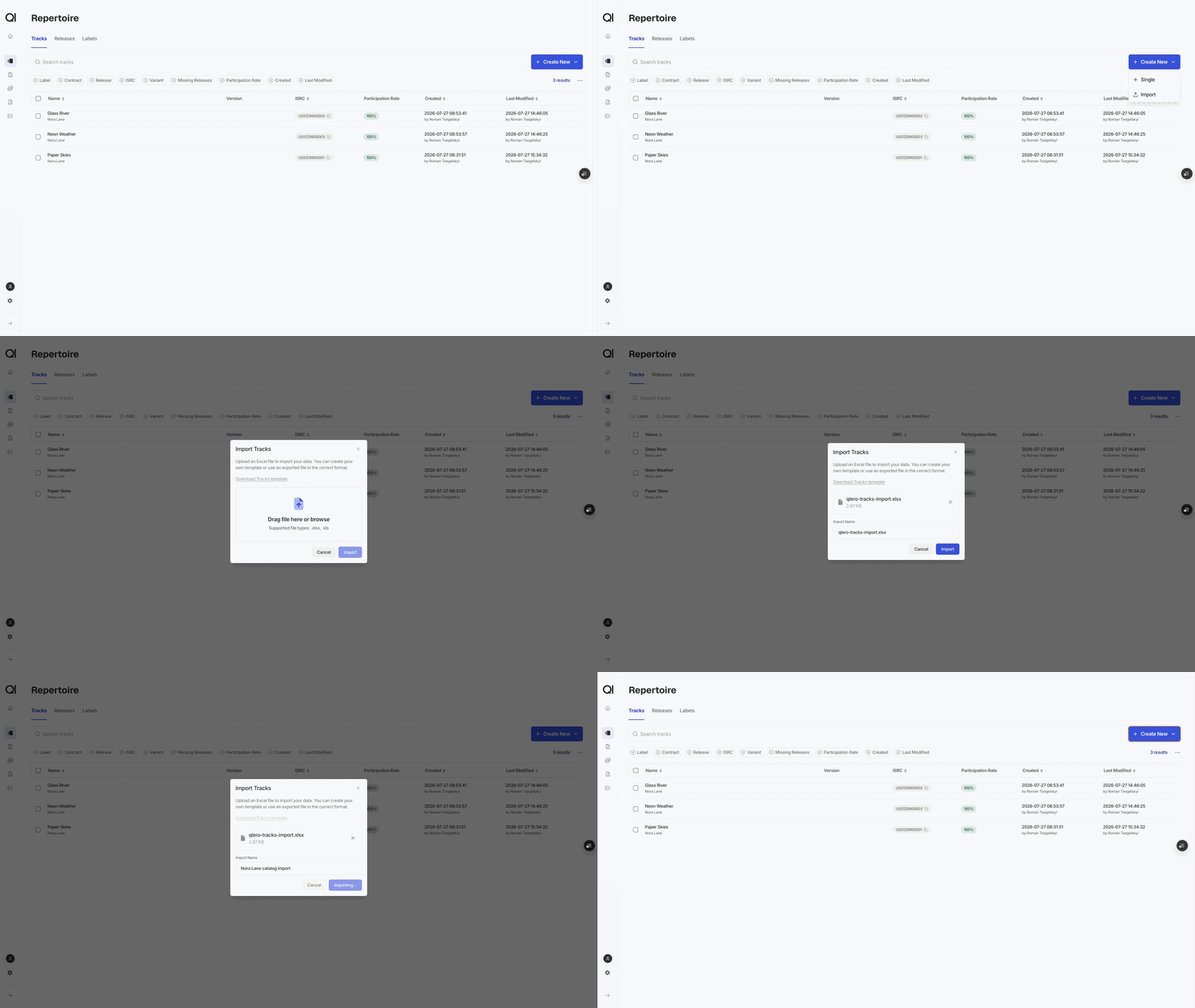
On Repertoire › Labels, Tracks, or Releases, choose Create New › Import. That dialog handles one type.To import several types in one file, go to Data Files › Imports and click New Import instead.
2
Get a file in the right shape
Click Download Tracks template (or Labels, or Releases) for an empty file with the right columns. In the multi-type dialog, open Need a template?, tick the types you want, and download one workbook with a sheet per type.To change items that already exist, start from an export instead. See Exporting.
3
Upload and name it
Drop in the
.xlsx or .xls file. The import name defaults to the file name; change it if you want something more recognisable in the list.4
Click Import
Qlero analyses the file in the background without applying any changes. The toast has a View import link to Data Files › Imports, where the import moves from Analysis In Progress to In Review.
Reviewing and committing
Nothing changes in your repertoire until you commit. Open the import from Data Files › Imports and click Review. The Summaries section counts what the import will do, per type: Created, Updated, and Deleted. Double check those numbers before you commit. For example, if a file you meant as an update shows 200 created rows, that most likely means that the Id column is empty. If the analysis found problems, the status reads Analysis Failed and the Errors section lists them with the sheet, the source row, and the message. Errors block the whole import, not just the offending rows. Fix the file and upload it again. You can delete a failed import from the list. When the status is In Review, click Commit Import. Committed imports cannot be deleted or undone.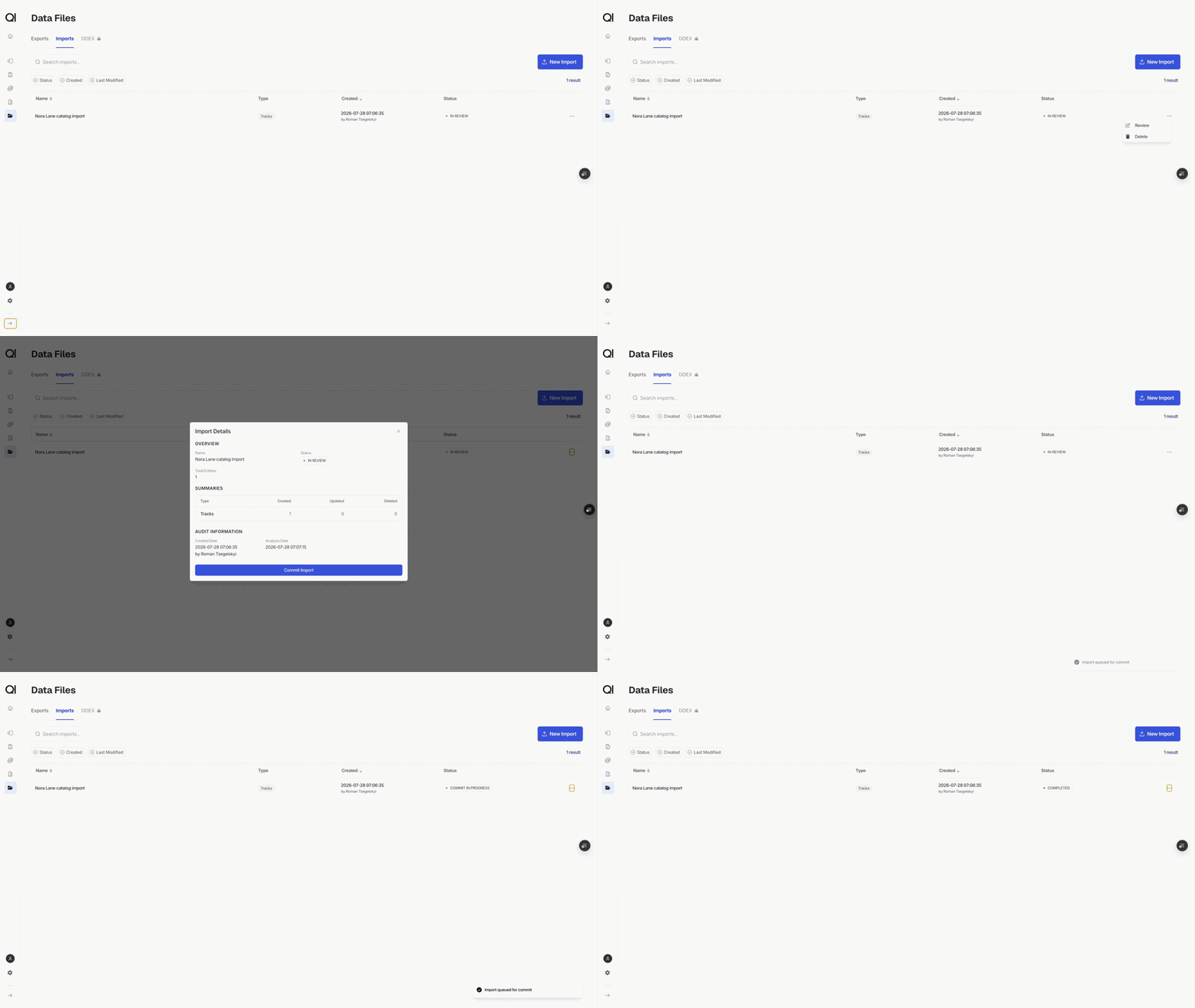
How Qlero processes the import file
Sheets are matched by name. A sheet must be called Labels, Tracks, or Releases. Anything else is reported as unrecognised, so rename it or remove it from the workbook. Sheet order matters. Labels come before Tracks, and Tracks before Releases. That order is what lets one workbook do the whole job. A label on the Labels sheet can be used by a track on the Tracks sheet, and that track can be listed on a release. Row 1 holds the column headers and row 2 the descriptions. Your data starts on row 3. Keep both header rows. Column A is Action. It takes Auto or Delete, and templates and exports fill it with Auto for you. Leave it as Auto unless you are deleting, and never leave it blank.The Id column decides create or update
The Id column decides whether a row creates something new or changes something that already exists.- Blank Id creates a new label, track, or release.
- An Id updates that exact item.
What each sheet needs
Labels has two columns, Id and Name. Names must stay unique. Tracks needs a Track title, a Track artist, and an ISRC. Write ISRCs without dashes. Label name must match a label that already exists or is created earlier in the same file. Duration here is a number of seconds, not themm:ss you type on the track page. Aliases takes several values separated by semicolons.
Releases needs a Release title, a Release artist, and a Barcode or a Catalog number. Format type name and Label name must already exist. Tracks holds the ISRCs on the release, separated by semicolons, and each one must resolve to a track. Release date is YYYY-MM-DD.
Contracts take one row each
Tracks and releases carry participation rates, and a spreadsheet row holds only one contract. An item with three contracts is three rows: repeat every column up to and including Aliases exactly, and vary only the contract columns. Qlero groups consecutive identical rows back into one item, so the rows have to be adjacent and the repeated cells have to match character for character. Fill Contract name with a contract that already exists, then Sales participation %, Cost participation %, or both. Overrides use their own four columns on their own rows: Override configuration type (Sale Type, Source, or Store), Override value, Override contract name, and Override participation %. An import sets the whole contract list for the item. Contracts missing from the file are removed from the track or release.Deleting rows
Set Action to Delete and give the Id. Everything else on the row is ignored. A delete fails if the item is still in use, and because errors block the whole import, one bad delete row stops the entire file. Tracks and releases that appear in a sales file or on a cost cannot be deleted at all. See Deleting tracks or releases.Exporting
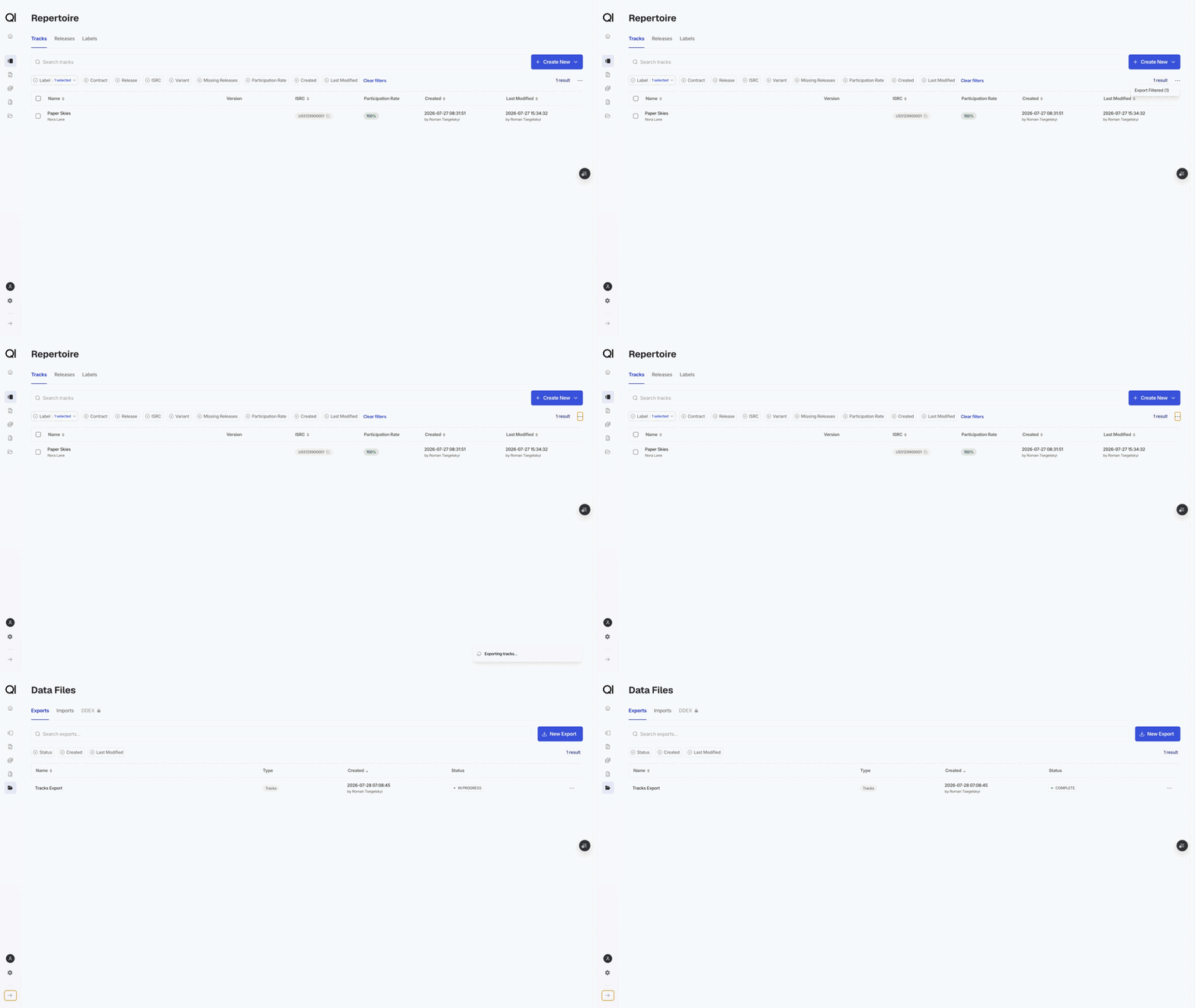
Every repertoire page has an export in the ⋯ menu beside the filters. What you get depends on what is on screen:- Export All downloads everything, and appears when no filters are set.
- Export Filtered replaces it as soon as a filter or a search is active, and covers every item matching the filter, not just the visible page.
- Export Selected appears when you have ticked rows.