

Editing external IDs and aliases requires write access to Repertoire. If the fields are disabled, ask your administrator. See User access and roles.
External ID
External ID is a optional field on the track and release forms, that can be used to store the item’s identifier in another system, such as a distribution platform or your own database. It is available for cross-referencing and export, but Qlero does not use it for sales matching.Aliases
An alias is an extra identifier that Qlero will match a sale on. When a sales file quotes a code that is not the track’s ISRC but is one of its aliases, the sale still lands on that track. The usual cases are a second ISRC for the same recording, or a distributor’s own product code. You can also map a YouTube asset to a track by adding the asset ID as an alias, so sales reported against that asset land on the right track. Releases work the same way alongside their barcode and catalogue number.Adding an alias
1
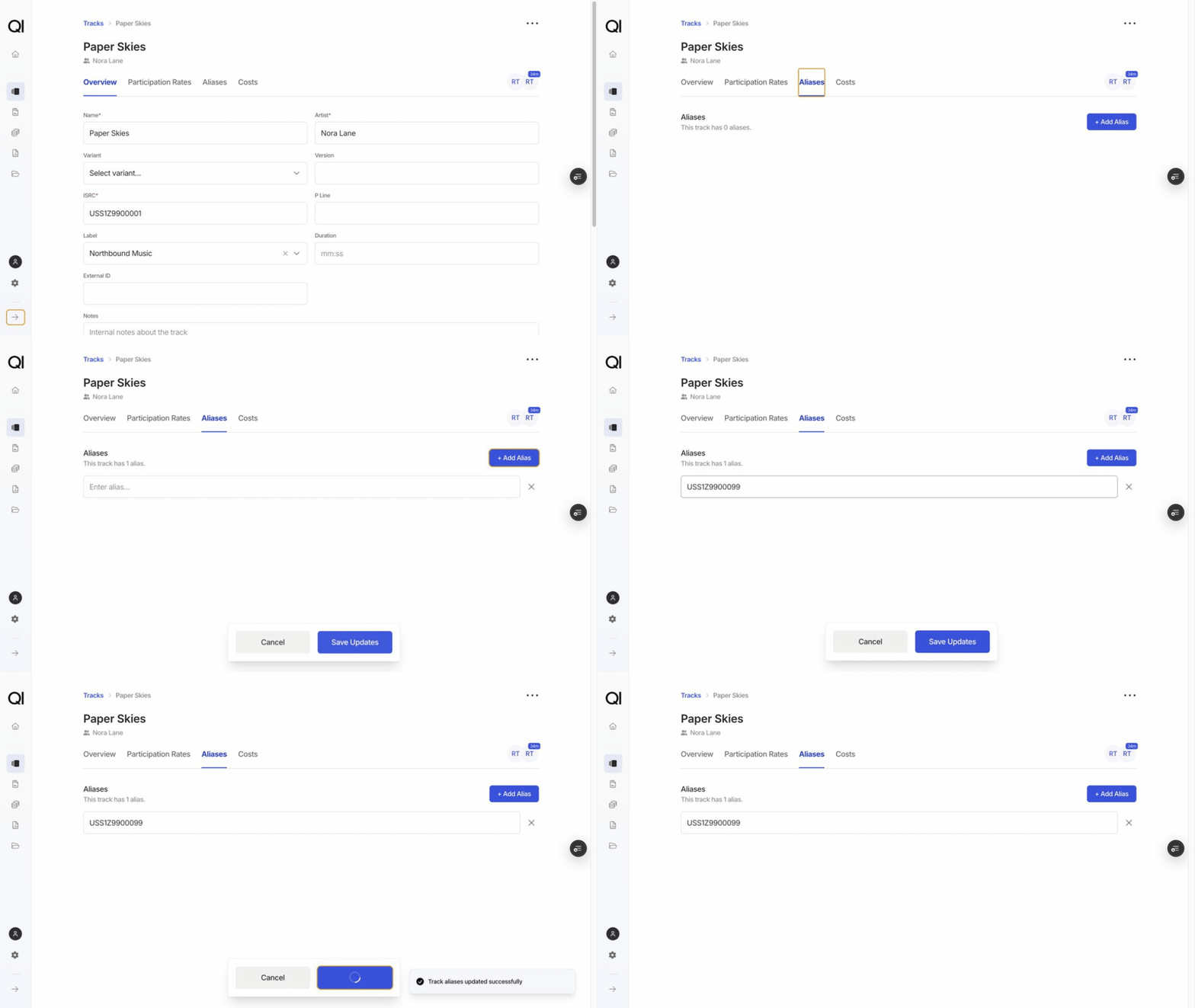
Open the track or release, then the Aliases tab
The tab lists the aliases the item already has and counts them above the list.
2
Click + Add alias
Type the identifier. Qlero checks it as you type and tells you if it is already taken.
3
Save
Remove an alias with the x beside it. Nothing takes effect until you save.
Rules
Unique within its own type. A track alias cannot duplicate another track’s alias or ISRC. A release alias cannot duplicate another release’s alias, barcode, or catalogue number. Not case-sensitive.ABC123 and abc123 count as the same alias, so you only need one of them.
Other ways aliases get added
- From a sales file: when you link an unmatched sale to an existing track, Qlero saves the code from the file as an alias, so later sales quoting it match on their own. See Adding new tracks and releases.
- From an Excel import: the Aliases column takes several values separated by semicolons. An import sets the whole list, so keep existing aliases in the row if you still want them. See Importing and exporting repertoire.