Fixing sales files requires view and write access to Sales Files (+ Sales Explorer). Linking or creating repertoire also requires view and write access to Repertoire & Agreements. If you don’t see Fix Now or the Map and Link Track controls, ask your administrator. See User access and roles.
Why a row is invalid
Open Income › Sales Files, select the file, then click Lines. Filter Line Status to Invalid and read Invalid Reason. Use Configure Columns to show that column if needed. A row can have more than one reason, so fixing one problem may leave another to resolve. An unrecognised sales value. The report contains a territory, sale type, format type, source, store, or currency that Qlero couldn’t recognise. For example, a provider’s territory value might need mapping to the country it represents. A reason such as Missing territory means the imported row has no recognised territory; the provider’s cell isn’t necessarily empty. An unmatched track or release. Unmatched ISRC means the incoming ISRC hasn’t matched a track. Unmatched release identifier means the barcode or catalogue number hasn’t matched a release. The repertoire may already exist under another identifier, or it may need creating. A missing date or exchange rate. A row needs both a Sale Date and a Transaction Date. Sales in another currency also need an exchange rate into the file currency. Missing any of these leaves the row invalid even when its repertoire is matched. Missing or unreadable data. Missing units, Missing gross amount, or Missing net amount means Qlero didn’t get the required number. Missing repertoire identifier means it has no identifier to match. These can need a corrected column mapping, parsing rule, or provider file rather than a value mapping. Use the reason to choose the repair. Creating another track won’t fix a missing amount, and changing an exchange rate won’t resolve an unknown ISRC.How the mapping manager helps
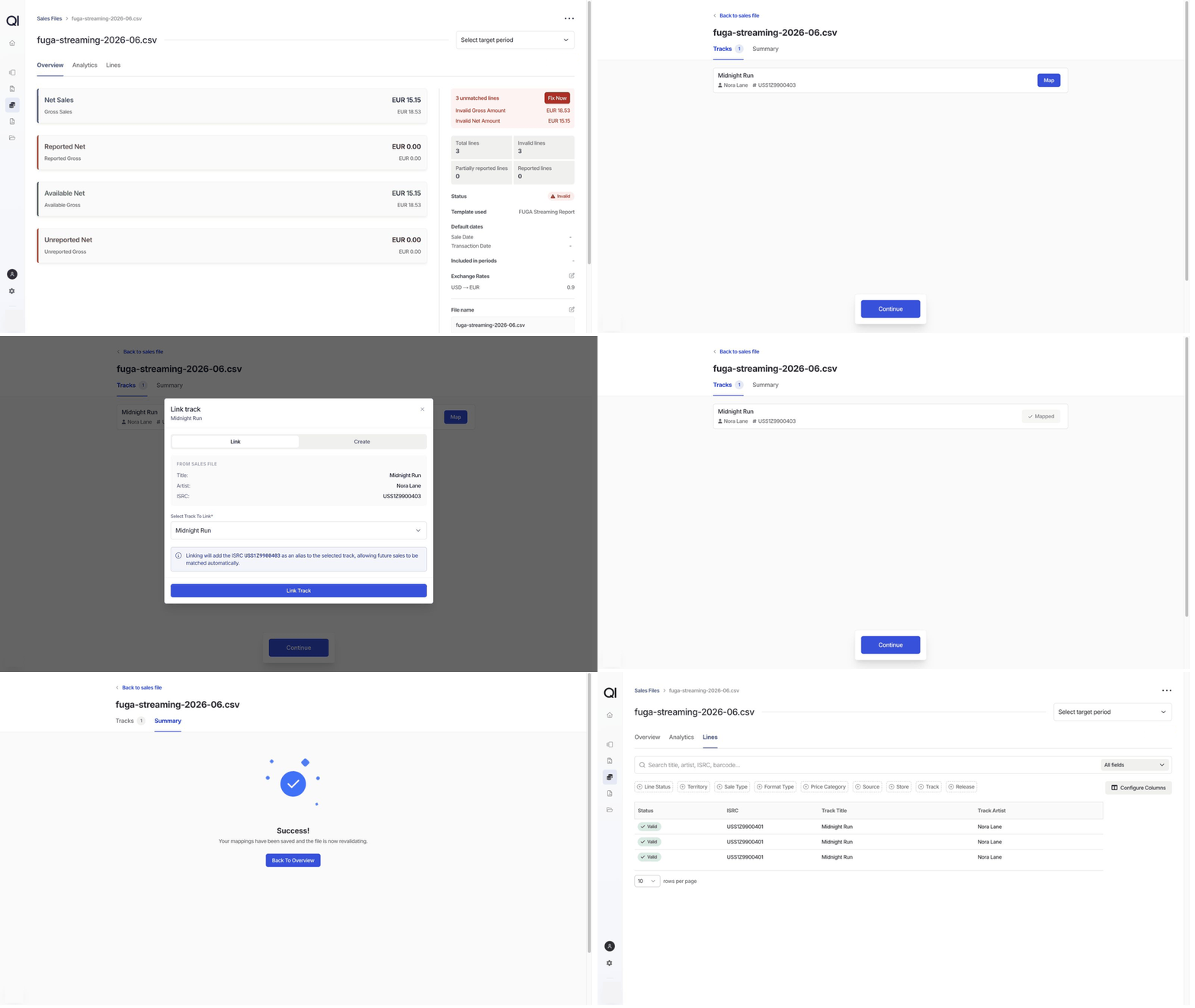
On the file’s Overview, click Fix Now in the unmatched-lines notice. The mapping manager groups the information it can help resolve into categories. Only categories with missing information appear, so each file can show a different set. Territories, Sale Types, Format Types, Sources, Stores, and Currencies. Choose the Qlero value that each incoming value represents. One mapping can repair many rows using the same provider value. These mappings are saved for the file’s template and can also help future imports using it. Dates. Supply missing file defaults. See Sales file overview for how default dates apply. Exchange Rates. Supply the rate requested for a recognised currency. See Add or update exchange rates for how Qlero applies rates. Tracks and Releases. Link an incoming identifier to existing repertoire, or create the repertoire if it’s absent. A row with both an ISRC and a release identifier needs both matches; matching the release doesn’t replace the track match. Click Continue through the categories you need, then review Summary and click Save And Revalidate. Qlero saves the changes and starts revalidation.Link to existing repertoire
For example,fuga-streaming-2026-06.csv reports Nora Lane’s Midnight Run under an alternate ISRC. The track already exists in Qlero, so link the incoming code to it. Match the actual recording: a similar title alone isn’t enough when an artist has several versions.
1
Open the mapping manager
Open the mapping manager as described above. Click Tracks for an unmatched ISRC or Releases for an unmatched barcode or catalogue number.
2
Choose the existing track or release
Click Map beside the incoming repertoire, then click Link. Search Select Track To Link for Midnight Run by Nora Lane and select it. For a release, use Select Release To Link.
3
Save the link
Click Link Track or Link Release. A track link adds the incoming ISRC as an alias. A release link adds the incoming barcode and catalogue number when supplied. The item shows Mapped in the manager.
4
Revalidate the file
Click Continue through any remaining categories, then open Summary and click Save And Revalidate. Click Back To Overview after the success message. Wait for revalidation to finish, then click Lines.If the missing repertoire match was the only problem, the affected rows are now Valid. Clear the Invalid filter to see them again.