

Creating costs requires view and write access to Costs, plus view access to Agreements to assign a contract or Repertoire to assign a track or release. If you don’t see Create New or can’t select an assignment, ask your administrator. See User access and roles.
Choose where the cost belongs
Assign most costs to the repertoire they belong to. Use a direct contract assignment when the expense belongs to that deal regardless of repertoire. Release. Use this for an expense covering the release as a whole, such as artwork for Nora Lane’s Harbor Lights. Qlero uses the release’s Costs participation rates. Track. Use this for an expense belonging to one recording. Qlero uses that track’s Costs participation rates. A release’s assignments don’t carry over to its tracks, or the other way around. Contract. Use this for an expense belonging to one deal. Qlero uses 100% participation, then applies the contract’s cost term. For a track or release, link the contracts under Participation Rates › Costs first. A link under Sales alone doesn’t allocate costs. See Assigning contracts to tracks and releases. Each participating contract needs a cost term that covers the expense’s Cost Type and Territory Group. For example, When Territory = Worldwide, AND Cost Type = Artwork, THEN allocate 50%.How much reaches the contract
Suppose the Harbor Lights artwork costs EUR 1,000, and Nora Lane Album Deal has 100% cost participation on the release and the 50% artwork term above. With the cost, payee, and period all in EUR, the contract carries EUR 500: EUR 1,000 × 100% × 50%. Qlero records a cost transaction of EUR -500, reducing the contract balance. Change only the release participation to 50%, and the contract carries EUR 250. Assign the same expense directly to the contract instead, and it carries EUR 500. Enter the full EUR 1,000 expense on the cost; the rates do the allocation.Create the cost
1
Open Income › Costs
Click Create New. If a menu opens, choose Single.
2
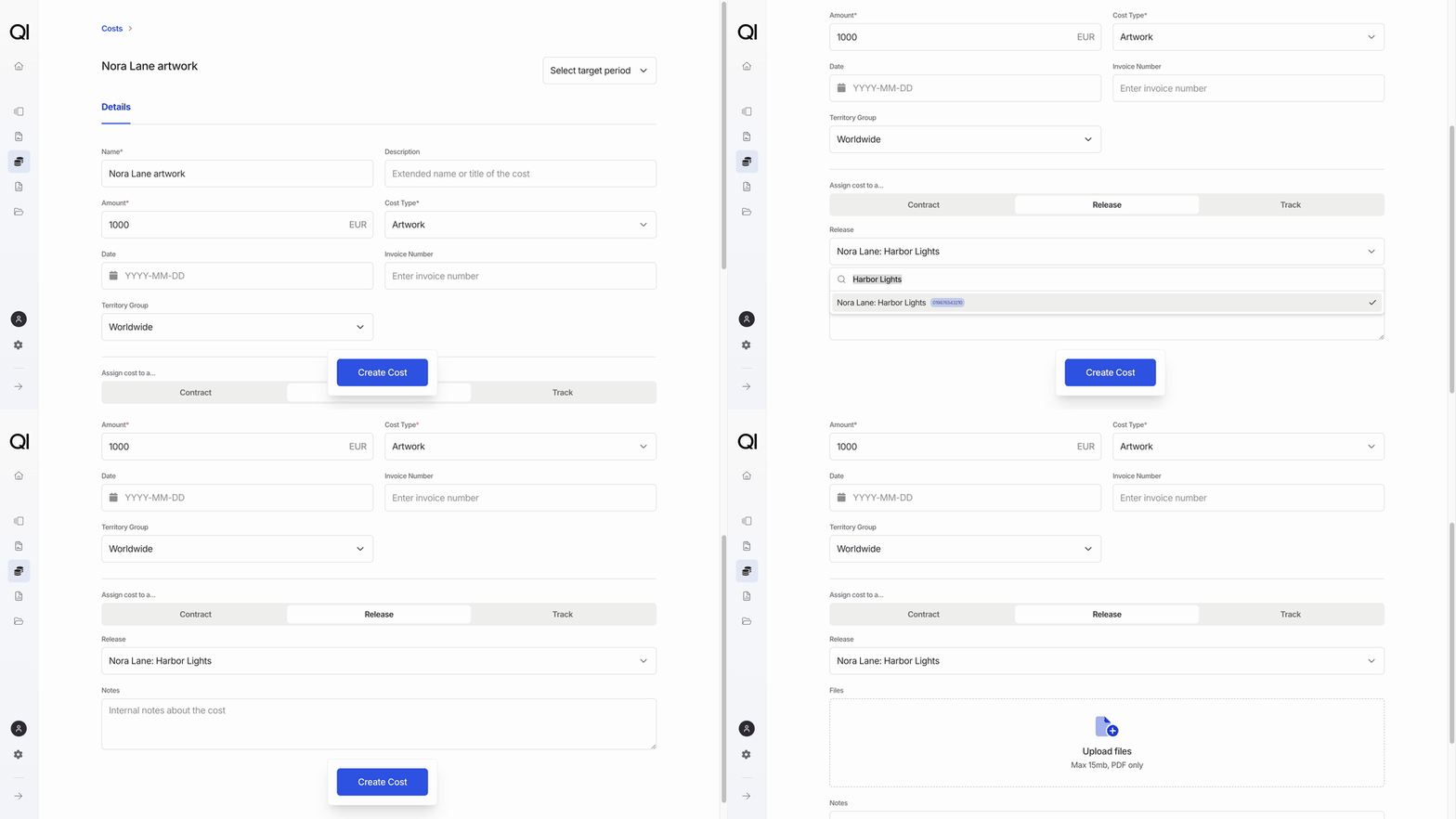
Enter the expense
Enter Name as
Nora Lane artwork, Amount as 1000 in EUR, and Cost Type as Artwork. Currency starts as your record company’s reporting currency.Keep Territory Group as Worldwide for this example. If the cost type doesn’t exist yet, add it under Types and Categories.3
Choose the assignment
Under Assign cost to a…, click Release, search for Nora Lane: Harbor Lights, and select it. For a different expense, choose Contract or Track and select the deal or recording instead.Date, Invoice Number, and Notes are optional. The Cost glossary explains the remaining fields.
4
Click Create Cost
The saved cost opens on its own page. You can now attach a PDF invoice under Files.
Include it in an accounting period
Saving the cost doesn’t change a balance. Select it in the Costs step when creating an accounting period, then calculate that period. Neither Date nor Target Period adds the cost to a period automatically. Change a cost. Open it from Income › Costs, edit the fields, and click Save Updates. Once it’s included in a period, its amount, currency, and assignment are locked, and it can’t be deleted.Next steps
- Include the cost when creating an accounting period.
- Record several expenses at once with Importing costs in bulk via Excel.