Viewing the Dashboard requires Artist Portal access to the payee. If your artist or company name doesn’t appear after you sign in, ask your record company’s administrator. See User access and roles.
Check your balance
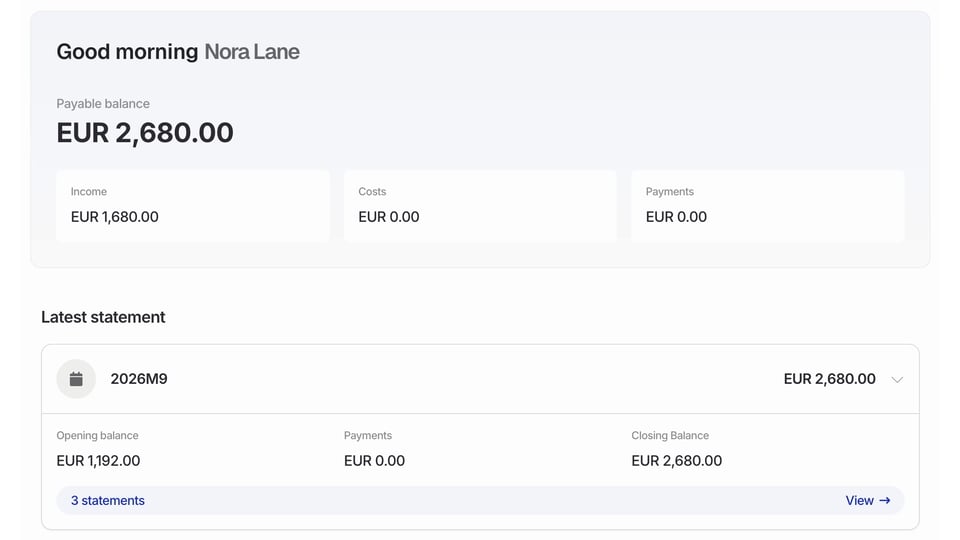
Payable balance. Your current balance for payment, based on your published statements and payment entries recorded since then. It can differ from the closing balance on your latest statement if a payment has since been recorded. The cards below it show: Income. Royalties, adjustments, and transfers into your contracts, as reported on your published statements. Costs. Costs on those statements. This card isn’t shown for a publishing-only record company. Payments. Payment entries recorded in Qlero. A recorded payment entry doesn’t by itself confirm that the money has reached your bank account. Costs and payments show as positive amounts, and different currencies appear separately. Earnings can still be held on a contract or used to recoup costs before they reach your payable balance. In the example below, Income is EUR 1,680.00. An existing EUR 1,000.00 opening balance brings Payable balance to EUR 2,680.00. Opening balances aren’t included in Income.